1
2
3
4
5
6
7
8
9
10
11
12
13
14
15
16
17
18
19
20
21
22
23
24
25
26
27
28
29
30
31
32
33
34
35
36
37
38
39
40
41
42
43
44
45
46
47
48
49
50
51
52
53
54
55
56
57
58
59
60
61
62
63
64
65
66
67
68
69
70
71
72
73
74
75
76
77
78
79
80
81
82
83
84
85
86
87
88
89
90
91
92
93
94
95
96
97
98
99
100
101
102
103
104
105
106
107
108
109
110
111
112
113
114
115
116
117
118
119
120
121
122
123
124
125
126
127
128
129
130
131
132
133
134
135
136
137
138
139
140
141
142
143
144
145
146
147
|
# News On Updates in F-Sy-H
**2018-08-09**
Added ideal string highlighting – FSH now handles any legal quoting and combination of `"`,`'` and `\` when highlighting
program arguments. See the introduction for an example (item #14).
**2018-08-02**
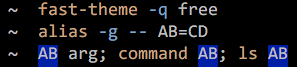
Global aliases are now supported:
**2018-08-01**
Hint – how to customize styles when using Zplugin and turbo mode:
```zsh
zplugin ice wait"1" atload"set_fast_theme"
zplugin light zdharma/fast-syntax-highlighting
set_fast_theme() {
FAST_HIGHLIGHT_STYLES[${FAST_THEME_NAME}paired-bracket]='bg=blue'
FAST_HIGHLIGHT_STYLES[${FAST_THEME_NAME}bracket-level-1]='fg=red,bold'
FAST_HIGHLIGHT_STYLES[${FAST_THEME_NAME}bracket-level-2]='fg=magenta,bold'
FAST_HIGHLIGHT_STYLES[${FAST_THEME_NAME}bracket-level-3]='fg=cyan,bold'
}
```
If you have set theme before an update of styles (e.g. recent addition of bracket highlighting) then please repeat
`fast-theme {theme}` call to regenerate theme files. (**2018-08-09**: FSH now has full user-theme support, refer to
[appropriate section of README](#customization)).
**2018-07-30**
Ideal highlighting of brackets (pairing, etc.) – no quoting can disturb the result:

`FAST_HIGHLIGHT[use_brackets]=1` to enable this feature (**2018-07-31**: not needed anymore, this highlighting is active
by default).
**2018-07-21**
Chroma architecture now supports aliases. You can have `alias mygit="git commit"` and when `mygit` will be invoked
everything will work as expected (Git chroma will be ran).
**2018-07-11**
There were problems with Ctrl-C not working when using FSH. After many days I've found a fix for this, it's pushed to
master.
Second, asynchronous path checking (useful on e.g. slow network drives, or when there are many files in directory) is
now optional. Set `FAST_HIGHLIGHT[use_async]=1` to enable it. This saves some users from Zshell crashes – there's an
unknown bug in Zsh.
**2018-06-09**
New chroma functions: `awk`, `make`, `perl`, `vim`. Checkout the [video](https://asciinema.org/a/186234), it shows
functionality of `awk` – compiling of code and NOT running it. Perl can do this too:
[video](https://asciinema.org/a/186098).
**2018-06-06**
FSH gained a new architecture – "chroma functions". They are similar to "completion functions", i.e. they are defined
**per-command**, but instead of completing that command, they colorize it. Two chroma exist, for `Git`
([video](https://asciinema.org/a/185707), [video](https://asciinema.org/a/185811)) and for `grep`
([video](https://asciinema.org/a/185942)). Checkout
[example chroma](https://github.com/zdharma/fast-syntax-highlighting/blob/master/chroma/-example.ch) if you would like
to highlight a command.

**2018-06-01**
Highlighting of command substitution (i.e. `$(...)`) with alternate theme – two themes at once! It was just white
before:

To select which theme to use for `$(...)` set the key `secondary=` in
[theme ini file](https://github.com/zdharma/fast-syntax-highlighting/blob/master/themes/free.ini#L7). All shipped themes
have this key set (only the `default` theme doesn't use second theme).
Also added correct highlighting of descriptor-variables passed to `exec`:

**2018-05-30**
For-loop is highlighted, it has separate settings in
[theme file](https://github.com/zdharma/fast-syntax-highlighting/blob/master/themes/free.ini).

**2018-05-27**
Added support for 256-color themes. There are six themes shipped with FSH. The command to switch theme is
`fast-theme {theme-name}`, it has a completion which lists available themes and options. Checkout
[asciinema recording](https://asciinema.org/a/183814) that presents the themes.
**2018-05-25**
Hash holding paths that shouldn't be grepped (globbed) – blacklist for slow disks, mounts, etc.:
```zsh
typeset -gA FAST_BLIST_PATTERNS
FAST_BLIST_PATTERNS[/mount/nfs1/*]=1
FAST_BLIST_PATTERNS[/mount/disk2/*]=1
```
**2018-05-23**
Assign colorizing now spans to variables defined by `typeset`, `export`, `local`, etc.:

Also, `zcalc` has a separate math mode and specialized highlighting – no more light-red colors because of treating
`zcalc` like a regular command-line:

**2018-05-22**
Array assignments were still boring, so I throwed in bracked colorizing:

**2018-05-22**<a name="assign-update"></a>
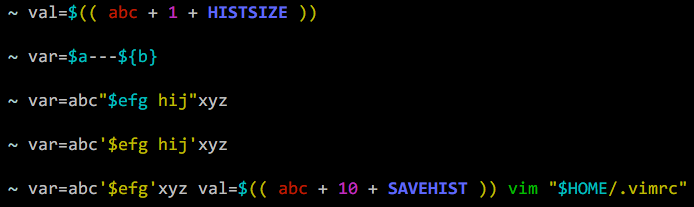
Assignments are no more one-colour default-white. When used in assignment, highlighted are:
- variables (outside strings),
- strings (double-quoted and single-quoted),
- math-mode (`val=$(( ... ))`).
**2018-01-06**
Math mode is highlighted – expressions `(( ... ))` and `$(( ... ))`. Empty variables are colorized as red. There are 3
style names (fields of
[FAST_HIGHLIGHT_STYLES](https://github.com/zdharma/fast-syntax-highlighting/blob/master/fast-highlight#L34) hash) for
math-variable, number and empty variable (error): `mathvar`, `mathnum`, `matherr`. You can set them (like the animation
below shows) to change colors.

|
